AI flubs fowl finding feature?
How I'm using AI, an imperfect but powerful tool.
Published: September 16, 2026
The live-streaming bird camera I installed recently for my mother-in-law includes an artificial intelligence feature that can notify users exactly what bird is frolicking in their video feed. I tried it the other day when an unfamiliar visitor splashed down in her bird bath.
I appreciate birds but am not even an armchair ornithologist and couldn’t identify it. My list of possibilities topped out at one. So, I clicked the app’s AI button to see if it could help.
It whirred away briefly before returning an answer that made me laugh out loud. It was, AI told me, a chicken.
I may not know birds, but I was confident the tiny bird bore no resemblance to Foghorn Leghorn. I was smugly condemning the AI’s capabilities when I glanced at the app again.
Roosting in the center of the bath, framed by an automatically added lime green box, was in fact a chicken. A decorative, gray, concrete chicken.
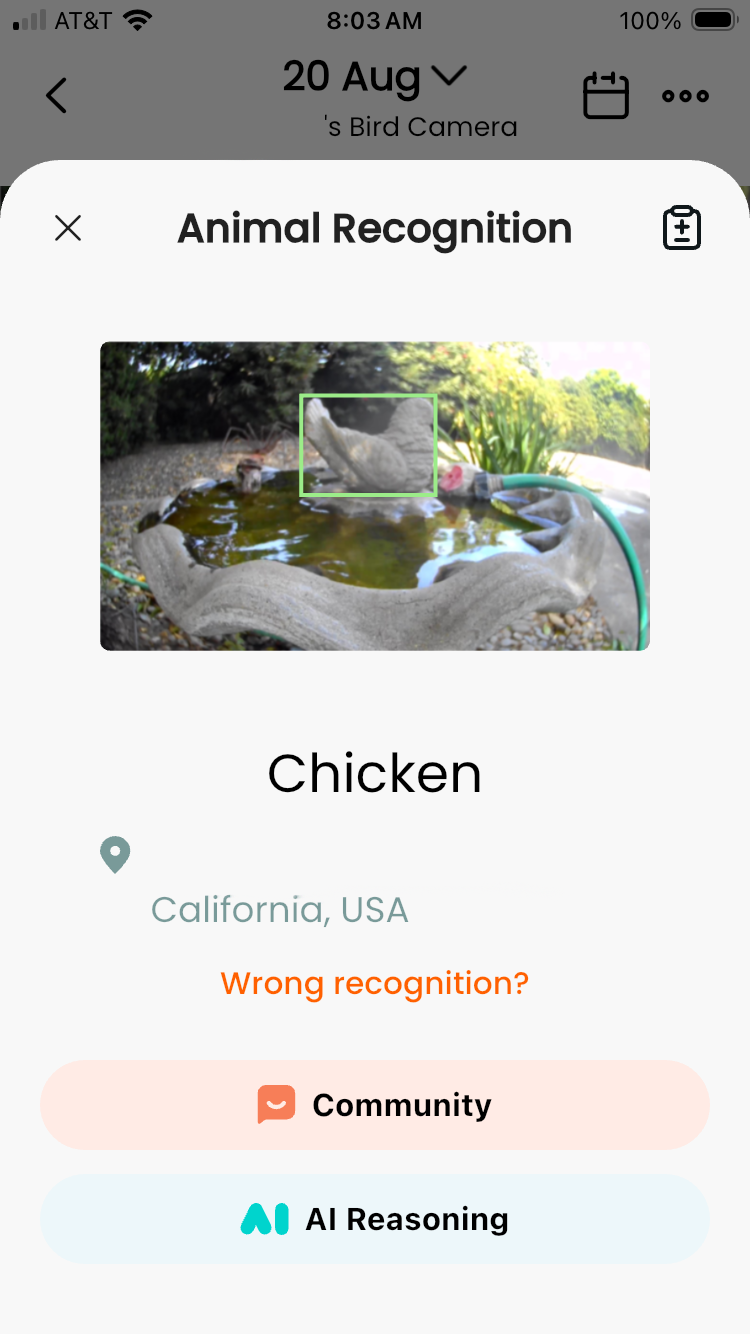 The AI was right. And the AI was wrong.
Long before AI, technology was eroding the barriers of expertise needed to achieve acceptable results for various crafts and skills. Photographic advancements, for example, like autofocus, through-the-lens (TTL) flash metering, and the instant feedback of digital photography enable more people to make better photos more often without getting mired in technical details.
Plenty of professional photographers utilize those features, too; they can legitimately free them to focus on other creative decisions. When I replaced my manual focus cameras with autofocus models, it felt like cheating. I soon realized Canon’s autofocus was faster and more accurate than me. I was still in charge of the light, color and composition within my photos, but autofocus helped improve the number of in-focus frames per roll.
Technology can be a mixed blessing, though. Most photographers can relate to being approached, usually when using a conspicuous telephoto lens, and being told to their chagrin, “That camera must take great photos.”
Just as owning a $6,000 camera won’t make you a professional or your photos better, merely using AI won’t guarantee successful results. Knowing how and when to use a tool’s features, and understanding their limitations, is one hallmark of a professional. AI doesn’t change that, but it does enable more people, me included, to produce better results more quickly across a wider variety of tasks than ever before.
The inanimate avian episode can validate however you feel about AI technology. Given its capacity to be authoritatively ignorant you could understandably consider it worthless and keep it at arm’s length. Or you might find its ability to recognize patterns helpful and embrace it for certain tasks despite the limitations.
There are other factors about AI to consider, too, like its complex economic and environmental impacts, thorny questions about the nature of authorship, copyright, creativity, and knowledge, even existential questions about whether AI poses a risk to humanity. Love it or loathe it, AI is getting impossible to avoid.
It’s also becoming important to acknowledge your working relationship with it, too. Mine is in the early stages.
When I began writing code in 2021, I resolved questions the old-fashioned way: searching stackoverflow.com. I also used books, blogs, forums and videos. Those resources generally offer more novice-friendly explanations than the technical documents of specific programming languages and libraries which are sometimes helpful despite themselves.
A few years later I began using VS Code and occasionally tested its built-in, complimentary Copilot AI code completions and chats to solve problems. The results were mixed. At times it was helpful, others it was a nuisance. Sometimes it was way off. I didn’t subscribe and continued looking online for help, even though it can be inefficient.
When a mentor and more experienced colleagues began mentioning their AI use in 2025, I began paying closer attention. There were, and are, strong opinions about its appropriate use. In general, it felt like a tool I needed to learn. After attending some AI sessions at NICAR 2026 and finishing an advanced prompt engineering course I began incorporating AI into my learning and work.
But what does that really mean? Despite their differences, many people lump many technologies under one AI umbrella: agentic AI, automation, chat bots, coding agents, large language models, image generators, natural language processing, and much more. Further complicating matters, terms like generative AI or vibe coding may mean different things to different people.
I primarily use agentic AI, command line tools like Anthropic’s Claude Code or Google’s Antigravity. Compared to my early experiments with Copilot in VS Code, they are more capable and reliable. Launched within the working directory of a project, they can incorporate the context of other files, connect to outside resources, and be adjusted via preference files. Generally, my use scenarios fall into three categories:
Learning
Though I’ll sometimes use AI to resolve a tricky regex pattern or to quickly jostle my memory for a bit of syntax, most of the time I ask Claude to explain, not fix an issue. Deconstructing the problem helps me learn what to do differently next time. If it’s an obvious mistake, Claude can insert the correction, but if it’s something I want to better understand, I’ll write the correction myself to reinforce the lesson.
Claude’s ability to explain complex syntax or workflows in more user-friendly language is invaluable, especially when using an unfamiliar language, process or service. When connected to source-specific Model Context Protocols, or even just pointed to their online home in the prompt, the results will be up to date, a bonus.
Claude is great at building reference files or tutorials I can revisit. I’ve assembled cheat sheets for different languages or tricky processes I don’t use often enough to commit to memory.
Debugging and troubleshooting
- Using Claude to audit sections of code or an entire project for accessibility, performance, scoping or security issues often uncovers problems I didn’t catch and some that are unfamiliar. Those reports and the ensuing lessons often get their own new file.
Tool building
I use Claude to create scripts or tools that don’t create content but instead aid in workflows or problem solving.
Confining and refining Claude’s results with skills and plugins helps generate predictable results using known workflows and reliable, verified sources. Associated Press investigative data reporter Aaron Kessler’s NICAR ’26 session demonstrated the kind of editorial workflows for which skills and plugins are especially helpful.
I’ve created skills that return time-stamped transcriptions with speaker diarization from recorded interviews and a tool that transcribes caption information audio files and assembles them into a searchable helper document to improve caption writing speed and accuracy on deadline. Neither skill feeds Claude outputs into public-facing content but they do save time.
I don’t use AI to write articles and blog posts, nor to generate charts, illustrations, maps, or photos. If AI’s contributions to a project’s content are materially significant, I’ll disclose how and why it was used.
I’ll continue using Claude, and other AI tools, with a bias for learning, to overcome coding challenges, and to build tools that allow me to work better or more efficiently. It will remain a tool in the bag I reach for at the appropriate time.
When the ‘chicken’ recently returned to the bird bath video feed I tried the AI button again. This time it correctly honed-in on the live bird and identified it as a House Finch.